
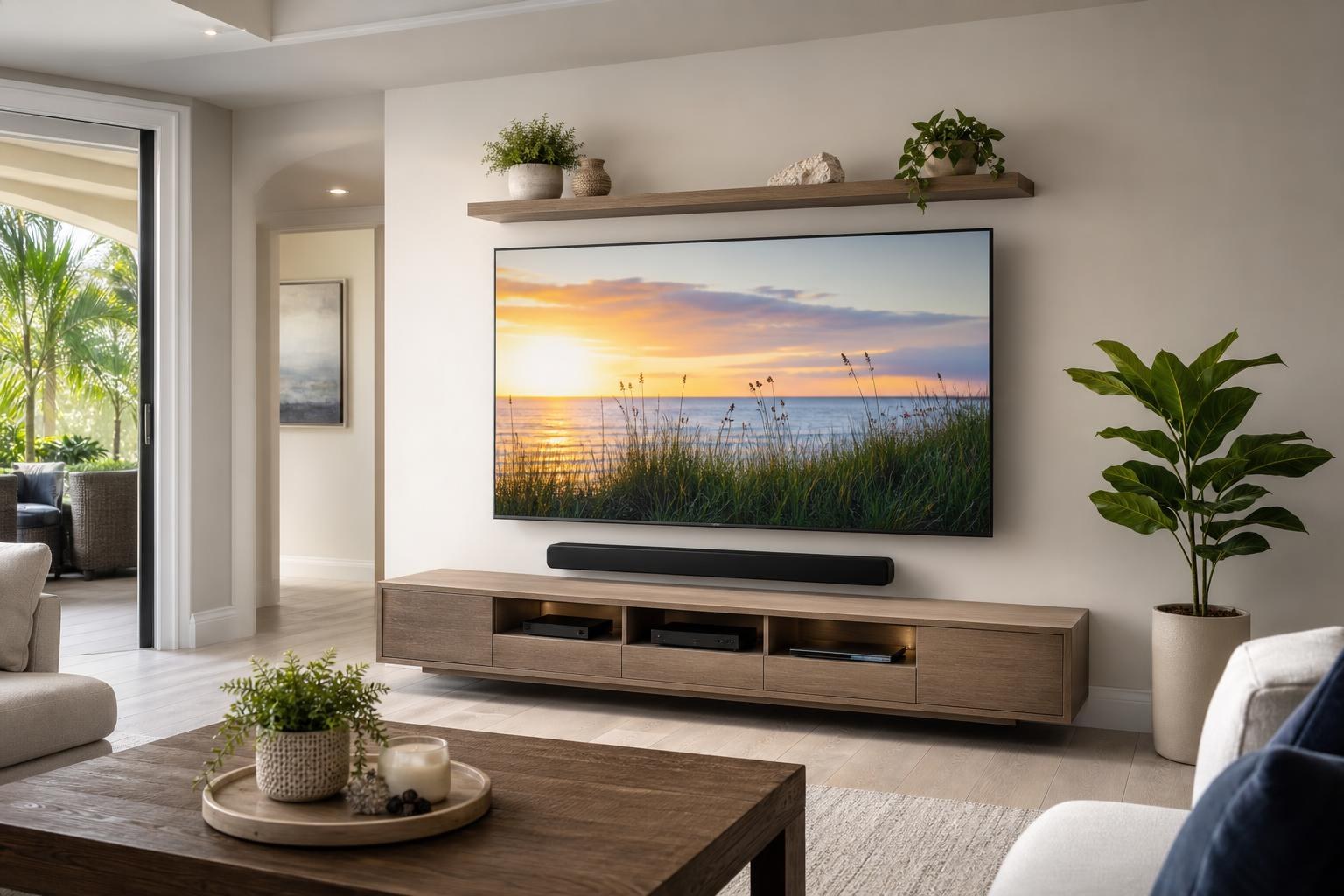
Will Your Entertainment Center Fit Under a Wall-Mounted TV? Plan the Wall as One System
August 25, 2026
You found an entertainment center that looks right online, and you already know where the TV should go. The remaining question seems simple: assemble the furniture, mount the screen above it, and connect everything.
In practice, those separate decisions can compete with one another. The furniture may be taller than expected. A soundbar can consume the open space below the screen. Cabinet doors may interfere with devices or cable paths. A TV centered on the wall may not align with an entertainment center centered around the seating area.
That is why TV mounting above an entertainment center is best treated as one coordinated project. Planning the complete wall before final placement helps create a setup that looks intentional, functions comfortably, and leaves room for the equipment your household actually uses.
Start With the Finished Entertainment Wall, Not One Individual Item
A TV, soundbar, media console, streaming player, Blu-ray player, and game console may all have compatible connections without forming a well-designed entertainment wall. The finished result depends on how their dimensions, access needs, and visual lines work together.
Before the TV position is finalized, consider the entertainment center’s assembled width and height. Product photos can make low-profile consoles appear smaller than they are, while hutches, bridge units, and floating cabinets can occupy significantly more wall space.
The main viewing position also matters. Centering everything on an architectural wall is not always the same as centering the screen for the sofa or primary seating. In open living rooms, angled seating arrangements and nearby walkways may make the practical viewing center different from the room’s geometric center.
Furniture Dimensions Influence TV Height
Homeowners often focus on TV size when discussing mounting height, but the furniture below the screen is an equally important factor. A taller entertainment center naturally pushes the TV upward if adequate visual separation is maintained. That can lead to an uncomfortable viewing position, especially when the seating is relatively close.
A low console typically provides more flexibility, but the final space must still account for a tabletop soundbar, decorations, device ventilation, and access to cabinet doors or drawers. If the soundbar will be attached beneath the TV instead, the combined TV-and-soundbar arrangement should be evaluated before the screen location is selected.
Useful questions to answer before installation include:
- What are the furniture’s actual assembled dimensions?
- Will the entertainment center sit on the floor or mount to the wall?
- Will the soundbar rest on the furniture or be mounted with the TV?
- Which devices need open access, ventilation, or remote visibility?
- Should the screen align with the furniture, the wall, or the primary seating?
- Will seasonal decorations or framed items share the wall?
These details help establish whether the original furniture and TV combination will work before the room is committed to an awkward layout.
Assembly Reveals Details That Product Listings Do Not
Online dimensions are valuable, but they do not always communicate how the assembled furniture will function in a real room. Door swings, drawer clearances, adjustable shelves, rear cable openings, center supports, and wall-contact points become much easier to evaluate once the unit’s design is understood.
Some media furniture also includes anchoring provisions that should be considered as part of the completed layout. Furniture anchoring is especially relevant when a unit is tall, has drawers, or may be accessible to children. It should not be treated as an afterthought once the TV and devices have already determined every available position.
Coordinating media-furniture assembly with TV mounting allows placement decisions to reflect the finished unit rather than an estimate based on a cardboard box or product photo. TV Mounting Ocala handles TV mounting, entertainment-center assembly, floating media furniture, soundbars, devices, and related wall-mounted items as connected parts of the entertainment space.
Soundbar Placement Can Change the Entire Layout
A soundbar is frequently added after the TV and console positions have been chosen. That can create blocked screen edges, crowded furniture surfaces, or a gap that looks disproportionately large.
The soundbar’s width, height, and intended location should be considered alongside the TV. A bar resting on the entertainment center needs a clear surface and should not obstruct the screen. A mounted soundbar needs to remain visually aligned with the TV while leaving appropriate separation from the furniture below.
Device connections also influence soundbar setup. The television, soundbar, streaming device, Blu-ray player, and other media equipment should be connected and programmed so that everyday use is straightforward. A clean wall loses much of its appeal if household members must repeatedly switch inputs or use several controls just to watch a program.
Plan Device Storage Before Concealing Media Cables
Cable organization is most effective when every device has a defined home. A streaming player may fit behind a TV or inside a cabinet, while a Blu-ray player or game console generally needs accessible shelf space. Remote performance, ventilation, controller access, and future device changes should all influence placement.
Media cable routing can then follow the planned relationship between the TV, soundbar, furniture, and devices. This prevents common visual problems such as cables stretched across an open shelf, excess cord length piled beside a console, or connections that become difficult to reach.
Professional wire and cable concealment focuses on creating a neat, organized path that fits the room and equipment arrangement. It is useful to decide in advance which devices will remain in the setup and which older components can be removed rather than organizing unused equipment into the new layout.
Floating Entertainment Centers Require Even More Coordination
A floating entertainment center creates a clean, contemporary appearance, but its position establishes a strong horizontal line across the wall. If that line is too high or too low, the TV can look disconnected even when both items are individually level.
The spacing between a floating cabinet, soundbar, and screen should appear deliberate. The layout must also preserve practical access to cabinet doors and media components. Nearby floating shelves, framed art, or wall-mounted speakers can add balance, but they should be planned around the TV rather than squeezed into leftover areas.
Because the TV and floating furniture both depend on the wall layout, coordinating them avoids competing centerlines and uneven spacing. The result should read as a single composition instead of several products installed independently.
What Can Make the Project More Complex?
Project scope depends on more than TV size. The entertainment center’s design, number of furniture components, wall conditions, mount style, soundbar arrangement, number of connected devices, cable-routing preferences, and programming needs can all affect the work involved.
Common factors include:
- Large or multi-section entertainment-center assembly
- Floating cabinets or shelves that must align with the TV
- Full-motion TV mounts requiring additional clearance planning
- Soundbars mounted as part of the screen arrangement
- Multiple streaming, gaming, Blu-ray, or media devices
- Furniture anchoring or adjacent picture and mirror hanging
- Detailed media-cable organization and concealment
Rather than relying on a generic estimate, homeowners can use the online quote and booking form to select the options that fit the current project.
How to Prepare Before the Appointment
You do not need to design the entire installation yourself, but a few details can make project planning more productive. Keep the TV model, mount, soundbar, entertainment-center packaging, and device components available. If the furniture has not been purchased, note its listed dimensions and save a link to the product page.
Decide which seating position should receive the most direct view and identify every device that needs to be connected. It also helps to know whether you want the entertainment center centered on a wall, aligned with the seating, or balanced with another feature in the room.
If you are replacing an existing setup, identify the equipment you intend to keep. This makes it easier to plan the cabinet layout, connections, controls, and cable organization without preserving obsolete items unnecessarily.
A Coordinated Project Produces a More Intentional Room
The best entertainment walls are not simply collections of properly assembled products. The TV height feels comfortable, the furniture fits the screen’s scale, the soundbar has a clear position, devices remain usable, and media cables do not dominate the view.
TV Mounting Ocala serves homeowners and property residents across Marion, Orange, Alachua, Sumter, and Citrus counties. If you are planning entertainment-center assembly and TV mounting as one project, call (352) 462-1913 or get an instant online quote and book your setup.
Ready to Get the Setup Off Your To-Do List?
Whether you are planning a new TV, soundbar, streaming setup, floating entertainment center, media furniture, pictures, mirrors, shelves, or another related mounting project, TV Mounting Ocala can help you turn the plan into a clean finished setup.
TV Mounting Ocala
(352) 462-1913
Project details, equipment, wall conditions, compatibility, availability, and final pricing can vary. Confirm your exact scope and quote before booking.
Related local services: Furniture Assembly Ocala
Serving another priority local market: TV Mounting The Villages.