
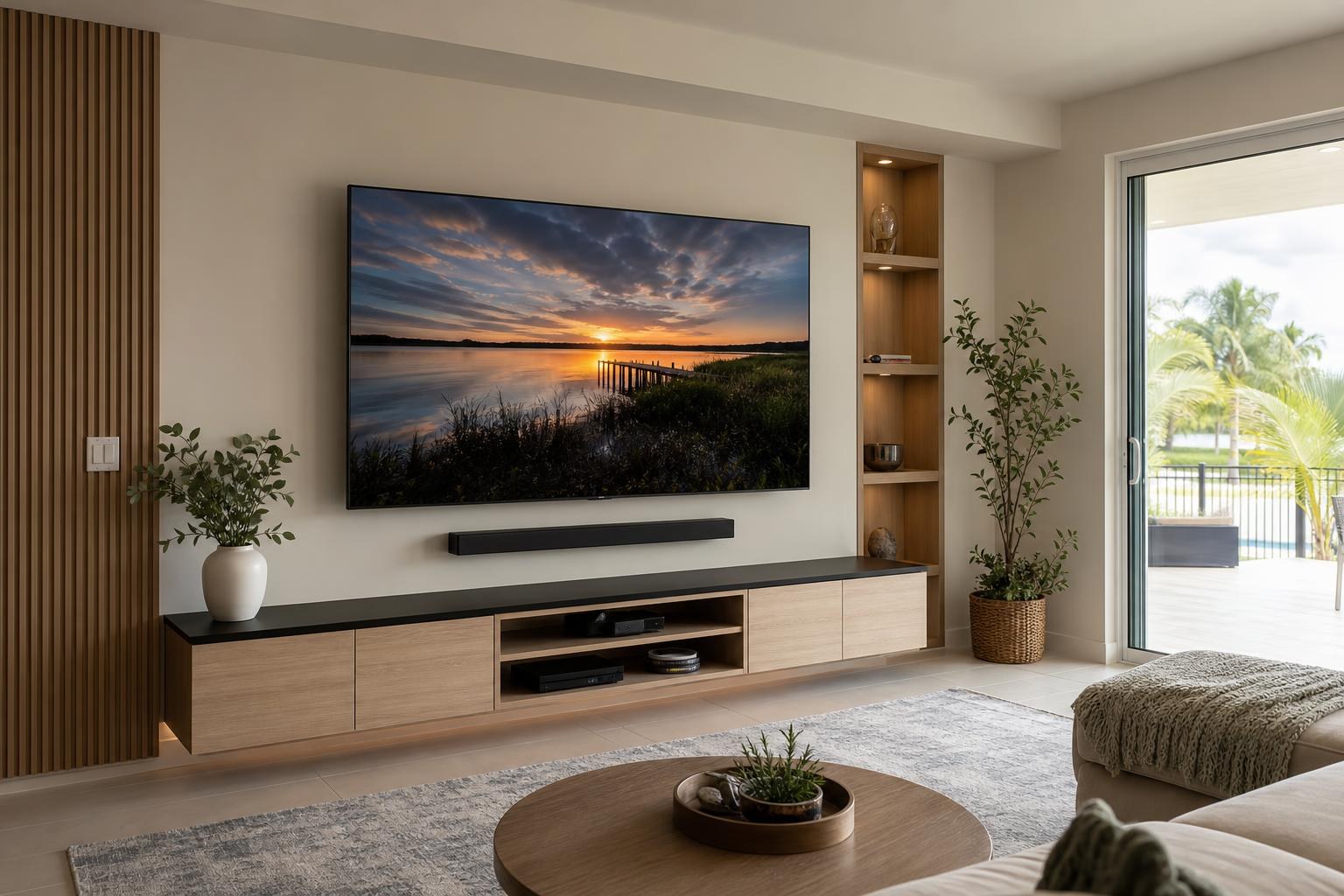
Floating Entertainment Center Planning: TV Height, Soundbar Space, and Device Access
September 14, 2026
A floating entertainment center can make a TV wall feel lighter, cleaner, and more intentional. But the result depends on more than centering a cabinet beneath the screen. The TV, console, soundbar, media devices, seating, and cables all need to work as one system.
Many layout problems begin when a homeowner buys the console first and plans everything else around it. The cabinet may be too narrow for the TV, too shallow for a game console, or positioned where doors and drawers are inconvenient to use. If the TV is already mounted, the available space may be even more restricted.
Before purchasing or booking installation, use the following planning points to evaluate the entire entertainment wall.
Start With the TV’s Actual Width, Not Its Screen Size
A TV’s advertised size is measured diagonally. That number does not tell you its full exterior width, and bezels vary among models. Use the manufacturer’s complete product dimensions when comparing the screen with a floating entertainment center.
There is no single console-to-TV ratio that works in every room. A console that extends beyond both sides of the TV usually creates a stable visual base, while a unit that is noticeably narrower can make a large screen appear top-heavy. The best proportion also depends on nearby windows, wall returns, artwork, shelves, and furniture.
If you are replacing a smaller TV later, consider the width of the future screen before selecting a permanently mounted console. Planning only for the current television can limit an otherwise useful upgrade.
Plan TV Height and Console Height Together
A floating cabinet should not dictate an uncomfortable TV position. The screen needs to relate to seated viewing height, viewing distance, and the type of mount being used. After establishing a comfortable TV position, the console can be placed within the remaining vertical space.
That space must accommodate more than an attractive gap. Account for any soundbar, upward-firing speakers, device cables, cabinet doors, and items that may sit on the console. A narrow separation can make the wall look crowded and leave little flexibility for future equipment.
The console’s height also affects daily use. A very low cabinet may make drawers inconvenient to reach, while a high unit can push the screen upward or compete visually with it. Evaluate the arrangement from the seats used most often rather than judging it only while standing in front of the wall.
Decide Where the Soundbar Belongs Before Finalizing the Layout
Soundbar placement is often treated as an afterthought, even though it changes the spacing between the TV and console. The soundbar might be mounted below the television, supported on the cabinet, or attached in a configuration that moves with certain TV mounts.
Each choice has practical consequences. A cabinet-supported soundbar uses surface space and may conflict with decorations or device placement. A wall-mounted soundbar requires a deliberate visual relationship with the television. It should not block the screen, cover the TV’s control area, or interfere with cabinet access.
Also confirm the soundbar’s width, depth, connection locations, and any clearance guidance from its manufacturer. If you expect to add a soundbar later, reserve the space now instead of trying to fit it into a finished wall.
Check Whether Your Devices Truly Fit Inside the Console
Exterior cabinet dimensions can be misleading. Interior dividers, hinges, door hardware, drawer mechanisms, and cable openings reduce usable space. Measure the equipment that will live inside the entertainment center, including the space needed for connected media cables.
Common items to plan for include:
- Streaming devices and their remotes
- Game consoles, controllers, and charging accessories
- Blu-ray players and media players
- Soundbar control boxes or related components
- Internet and home-entertainment equipment
- Extra HDMI and media cables that need organized storage
Some equipment needs open space around it for normal operation, and enclosed doors can affect heat management or remote-control response. Product guidance should influence whether a device belongs in an open shelf, behind a suitable door, or outside the cabinet.
Preserve Access to Connections and Controls
A minimal entertainment wall can become frustrating if every connection is hidden behind an immovable component. Devices may need to be reset, replaced, reconnected, or moved to another TV input. Game consoles and Blu-ray players also need convenient disc, button, and controller access.
Plan how cabinet doors open and how drawers extend in relation to rugs, coffee tables, speakers, and nearby furniture. Check whether frequently used controls remain reachable without moving decorations or pulling equipment out of the cabinet.
Thoughtful access is especially important when several devices are being programmed to work together. TV Mounting Ocala can assist with TV setup, streaming-device hookup, Blu-ray integration, soundbar setup, and home entertainment programming as part of a coordinated installation.
Treat Cable Routing as Part of the Design
A floating console exposes the wall and floor area that traditional furniture would hide. Unplanned HDMI, soundbar, streaming-device, and other media cables can therefore become the most noticeable part of the finished wall.
Before installation, identify which devices connect directly to the TV, which connect through other equipment, and which items may be added later. The goal is to create an organized route while maintaining reasonable access for updates and troubleshooting.
Cable concealment choices depend on the wall, the mount, the console design, and the equipment layout. Some floating cabinets include useful routing openings; others place openings where they do not align well with the planned devices. A professional can evaluate these details before the unit and screen positions are committed. You can review the company’s TV mounting and home entertainment services when planning the project scope.
Confirm That the Wall and Cabinet Belong in the Same Plan
Floating entertainment centers vary widely in construction, assembly quality, mounting design, and intended use. Some arrive as multiple cabinets that must align precisely. Others combine doors, drawers, open shelves, and separate wall panels. The wall material and the manufacturer’s mounting system can affect whether the desired layout is practical.
Do not assume the mounting hardware packaged with a cabinet is appropriate for every wall. Product documentation, cabinet weight, stored equipment, wall conditions, and the desired position all need to be reviewed together. This is one reason furniture assembly and wall mounting are best coordinated rather than treated as unrelated appointments.
If the unit is still in its box, confirm that all panels, hinges, mounting components, and shelves are present before the scheduled service. Keep the product instructions available, even if professional assembly is planned.
Account for Doors, Walkways, and Off-Center Room Features
The geometric center of a wall is not always the correct center for the entertainment setup. An open-concept room may have seating positioned toward one side. A doorway, window, thermostat, return wall, or traffic path can also change the usable visual area.
In these rooms, center the TV and console around the primary viewing relationship rather than an arbitrary wall measurement. The screen and cabinet should look aligned with each other, but the complete grouping also needs to feel balanced from the main entry and seating positions.
If a swivel mount is being considered, check how the TV appears both flat against the wall and angled toward secondary seating. The console should remain visually connected to the screen even when the TV moves.
Leave Flexibility for Future Entertainment Upgrades
A highly tailored wall can look impressive on installation day but become restrictive when equipment changes. TVs, soundbars, consoles, and streaming devices do not all use the same dimensions or connection locations.
Useful flexibility may include extra cabinet width, an open device compartment, accessible media-cable routing, or enough vertical room for a future soundbar. The goal is not to leave the wall unfinished. It is to avoid a layout that works with only one exact combination of products.
What to Have Ready Before Requesting a Quote
A few details can make planning and quoting more productive:
- TV brand, model, and full exterior dimensions
- Floating entertainment center link, model, or assembly instructions
- Soundbar and media-device models
- Photos of the full wall and nearby seating
- Preferred cabinet location and primary viewing position
- A list of devices that need hookup or programming
- Your goals for visible media-cable organization and concealment
If the TV is already mounted, include its current height and photos showing the space below it. If the console has not been purchased, sharing a few candidate models can help identify potential conflicts before delivery.
Plan the Wall as One Finished Installation
The cleanest floating entertainment walls are planned in the correct order: viewing comfort, TV position, console dimensions, soundbar placement, device storage, access, and cable organization. Considering each item separately can produce awkward spacing and avoidable compromises.
TV Mounting Ocala provides TV mounting and setup, floating entertainment-center installation, media-furniture assembly, soundbar setup, device hookup, entertainment programming, and media-cable concealment across Marion, Orange, Alachua, Sumter, and Citrus counties.
When you are ready to coordinate the screen, console, soundbar, and devices, get an instant online quote or contact TV Mounting Ocala with your product details and wall photos.
Ready to Get the Setup Off Your To-Do List?
Whether you are planning a new TV, soundbar, streaming setup, floating entertainment center, media furniture, pictures, mirrors, shelves, or another related mounting project, TV Mounting Ocala can help you turn the plan into a clean finished setup.
TV Mounting Ocala
(352) 462-1913
Project details, equipment, wall conditions, compatibility, availability, and final pricing can vary. Confirm your exact scope and quote before booking.
Related local services: Furniture Assembly Ocala