
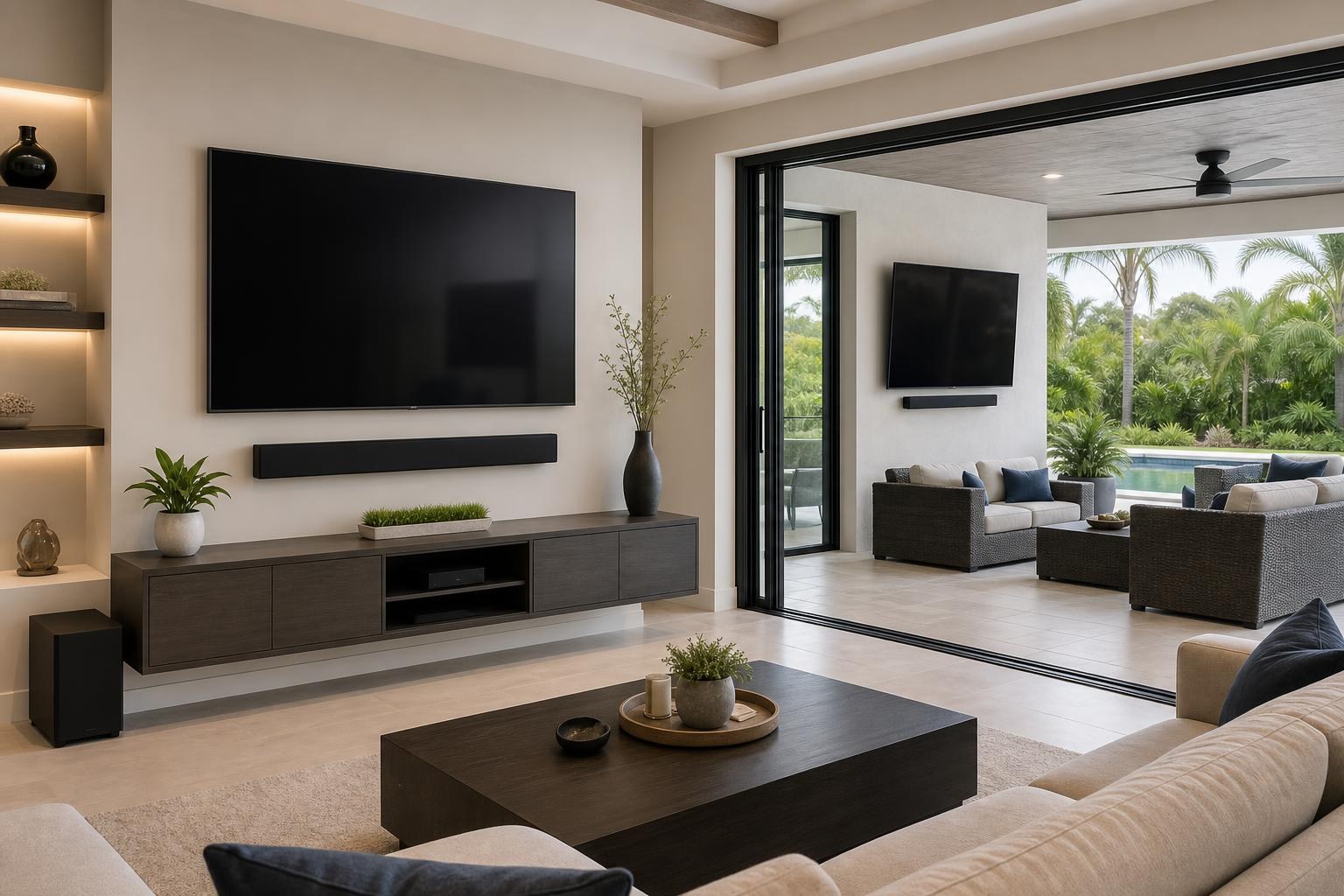
Planning Two TV Zones in a Citrus County Home: Living Room and Lanai Setup Guide
September 21, 2026
Adding a TV to both the living room and lanai can make a Citrus County home more enjoyable, but the two spaces should not be planned as matching installations. A comfortable indoor media wall may prioritize centered seating and a polished furniture layout, while a lanai setup has to account for changing daylight, wider viewing angles, sound coverage, and exposure.
The best time to resolve those differences is before either TV is mounted. Whether you are furnishing a home in Inverness, updating a property near Crystal River, or finishing a new entertainment area elsewhere in Citrus County, a coordinated plan can help both spaces feel intentional.
Start With How Each TV Zone Will Be Used
A living room TV often supports longer viewing sessions: movies, streaming series, gaming, and everyday family use. This makes seating distance, screen height, soundbar placement, and easy control of connected devices especially important.
A lanai TV may serve a different purpose. It might be used for sports during gatherings, casual background viewing, or programs watched from several seating groups. That can make visibility from multiple positions more valuable than having one perfectly centered seat.
Before selecting a wall or mount style, clarify the main role of each screen. If the living room is the primary media area, it may need more device integration and furniture planning. If the lanai will regularly host groups, the ability to adjust the screen toward different seats may deserve greater attention.
Plan the Living Room as One Complete Media Wall
The TV should not be positioned in isolation from the rest of the room. Its height and horizontal placement need to work with the sofa, media console, soundbar, shelves, artwork, and walking paths.
A common planning mistake is choosing a TV position first and considering the furniture afterward. This can leave a console looking noticeably off-center, a soundbar crowded against the screen, or decorative pieces competing with the display. If a floating entertainment center is part of the project, its dimensions and intended height should be considered at the same time as the TV.
Check the full wall composition
Stand back and evaluate the wall as a finished arrangement rather than an empty surface. Useful questions include:
- Will the TV align visually with the main seating area?
- Is there enough room for a soundbar without making the wall look compressed?
- Will a media console or floating entertainment center remain proportionate to the screen?
- Where will streaming devices, a Blu-ray player, or game systems be kept?
- Can media cables be routed and organized without dominating the wall?
If furniture still needs to be assembled, completing that part of the room in coordination with the TV setup can make final alignment more predictable. TV Mounting Ocala provides TV installation alongside related services such as media-furniture assembly, soundbar setup, device hookup, and floating entertainment-center installation. Homeowners can review the available TV mounting and entertainment services while planning the project.
Treat the Lanai as a Different Viewing Environment
A covered lanai may feel like an extension of the living room, but screen visibility can change significantly throughout the day. Bright openings, reflective surfaces, and sunlight shifting across the space can make a location that looks ideal in the morning less comfortable later.
Check the proposed TV area during the hours when the lanai will be used most. Consider reflections from windows, doors, water, pale flooring, and neighboring surfaces. Mounting the screen higher is not automatically the answer; excessive height can still create an uncomfortable viewing angle from typical patio seating.
The TV and mounting hardware also need to be appropriate for the environment and the manufacturer’s placement guidance. A roof overhead does not necessarily give every part of a lanai the same protection. Wind-driven moisture, humidity, direct sun, and temperature changes should be considered when selecting equipment and placement.
Decide whether the screen needs to move
A fixed mount can create a streamlined appearance when seating stays in one main location. An adjustable mount may be more useful when viewers move between a dining table, lounge chairs, and a poolside area. The decision should reflect actual sightlines rather than simply choosing the mount with the most movement.
Also consider clearance around nearby doors, columns, shades, cabinets, and furniture. The screen should not interfere with how the lanai functions when it is turned or returned to its resting position.
Plan Sound for the Room, Not Just the TV
Sound behaves differently in a furnished living room than it does in a more open lanai. Indoors, rugs, curtains, upholstery, and room shape can influence clarity. Outside, sound may disperse quickly or become harder to hear when fans, conversation, and neighborhood activity are present.
A soundbar can improve dialogue and create a more complete viewing experience, but its placement should be coordinated with the TV. The bar should not block the lower edge of the display or look like an afterthought. If an adjustable TV mount is used, the soundbar arrangement should also make sense as the screen changes position.
Connection compatibility matters as well. TV ports, soundbar inputs, streaming devices, and media players should be reviewed together. Professional setup can help ensure the correct sources are selected, sound is routed as intended, and everyday controls are understandable for the household.
Choose a Simple Device Strategy for Both TVs
Two TV zones can become frustrating when each one has a different collection of remotes, apps, input names, and loosely placed devices. Before the appointment, decide which services and equipment each screen actually needs.
The main living room may include a soundbar, game console, Blu-ray player, and several streaming apps. The lanai might only need a streamlined streaming setup. Keeping the secondary TV simpler can reduce visible clutter and make it easier for guests or family members to use.
For each space, identify:
- The streaming services the household regularly uses
- Any Blu-ray players, consoles, or other media devices to connect
- Whether a soundbar will be mounted or placed on furniture
- Where devices and remotes should be stored
- How visible media cables should be routed and organized
Have account details available if app sign-in or streaming-device setup is part of the appointment. It is also helpful to confirm that remotes, stands, soundbar brackets, and manufacturer-supplied accessories are present before installation day.
Should Both TVs Be Installed During the Same Project?
Planning both zones together can make it easier to compare screen heights, mount styles, device needs, cable concealment options, and furniture requirements. It also gives the homeowner a clearer view of the complete scope when requesting a quote.
That does not mean the two installations must look identical. A fixed living room screen above a floating console and an adjustable lanai screen can still feel connected through clean alignment, organized cables, and consistent attention to detail.
When requesting a quote, include the number and size of TVs, the wall surfaces, preferred locations, soundbars, media devices, furniture assembly needs, and any existing mounts you hope to use. Photos of both spaces can also help communicate the intended setup. Final pricing depends on the current online quote and the options selected for the project.
Prepare the Rooms Without Trying to Pre-Install the Setup
You do not need to determine every technical detail before booking. Focus instead on clearing access to the proposed walls, confirming the primary seating locations, gathering devices and accessories, and identifying the finished look you prefer.
If you are undecided between two walls or mount styles, explain how the room is used and what you want to improve. A professional can help evaluate practical placement, viewing comfort, mount compatibility, soundbar positioning, media-device hookup, and cable organization without turning the room into a trial-and-error project.
Book TV Mounting in Citrus County
TV Mounting Ocala serves Citrus County as part of its Central Florida service area, with support for TV wall mounting, TV setup, soundbar installation, media-device hookup, streaming setup, cable concealment, floating entertainment centers, and related media-furniture work.
If you are planning a living room, lanai, or coordinated two-TV project, use the instant online quote and booking form to describe both spaces and select the relevant options. You can also contact TV Mounting Ocala or call (352) 462-1913 with questions about the scope of your setup.
Ready to Get the Setup Off Your To-Do List?
Whether you are planning a new TV, soundbar, streaming setup, floating entertainment center, media furniture, pictures, mirrors, shelves, or another related mounting project, TV Mounting Ocala can help you turn the plan into a clean finished setup.
TV Mounting Ocala
(352) 462-1913
Project details, equipment, wall conditions, compatibility, availability, and final pricing can vary. Confirm your exact scope and quote before booking.
Related local services: Furniture Assembly Ocala