
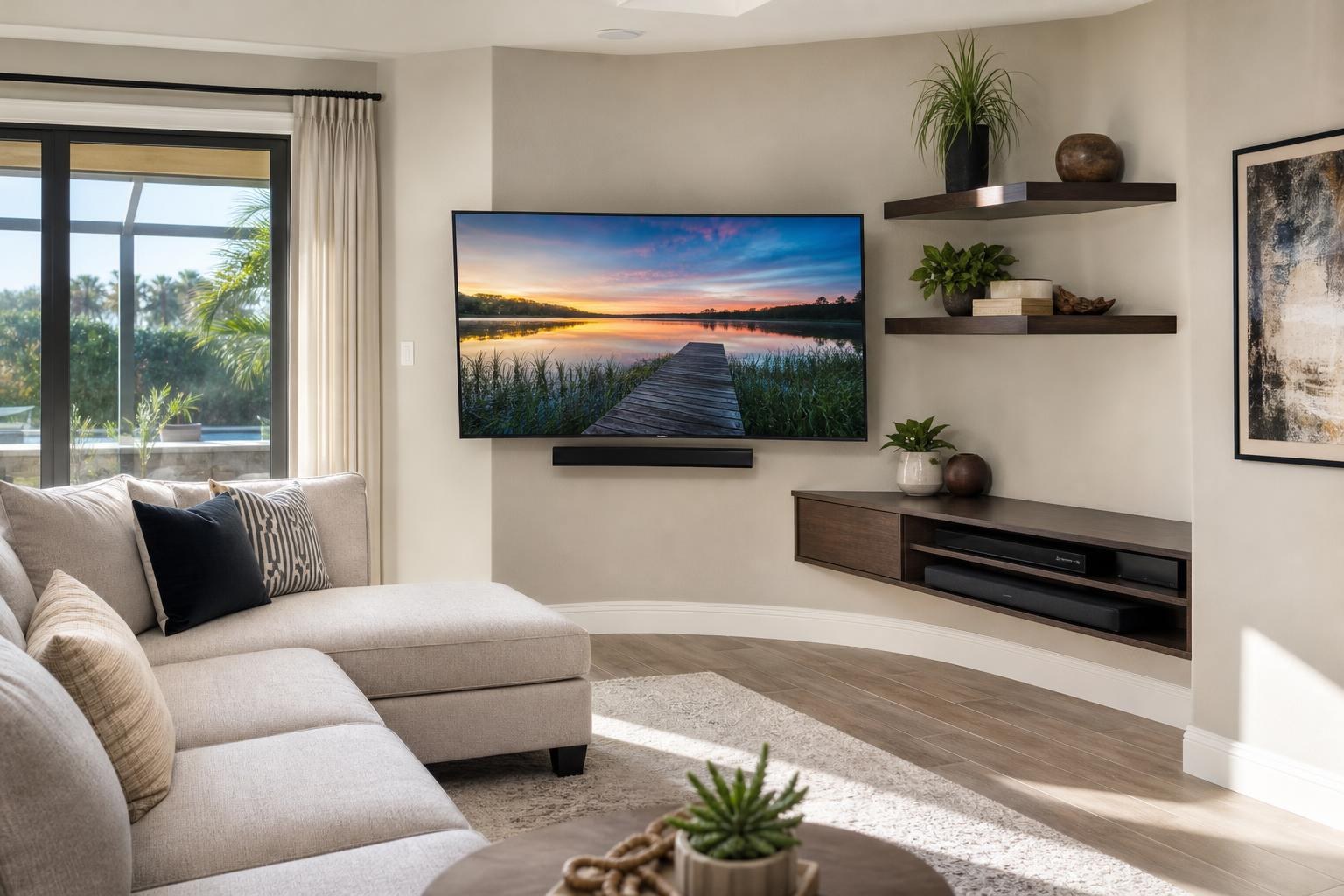
Corner TV Cable Planning: Coordinate a Swiveling Screen, Soundbar, Devices, and Furniture
November 2, 2026
A corner-mounted TV can solve a difficult room layout, but the screen’s position is only part of the decision. Once the TV swivels away from both adjoining walls, cables must move without pulling, the soundbar must remain directed toward the audience, and nearby furniture must support the setup without obstructing the mount.
These details are easy to miss when viewing the room from one seat. A corner installation may need to serve a sofa, recliner, dining area, or open kitchen, and every adjustment changes how the complete entertainment system behaves.
Before booking TV Mounting Ocala, consider the screen, soundbar, devices, cables, and furniture as one coordinated system rather than separate pieces.
Why Corner TV Cable Planning Is Different
A flat TV mounted parallel to one wall has a relatively predictable cable path. A corner TV on a movable mount introduces depth, rotation, and changing distance from the wall.
The screen may sit close to the corner when not in use, extend forward for viewing, or rotate toward a second seating zone. Media cables need enough flexibility for those intended positions without becoming visible loops or getting compressed behind the TV.
The adjoining walls also create competing visual lines. A cable route that looks discreet while the TV faces the sofa may become conspicuous when the screen turns toward the dining area. That is why the preferred viewing positions should be settled before cable concealment and device placement are finalized.
Define the TV’s Real Movement Range
Many homeowners know they want the TV to swivel but have not identified how far or how often it will move. That distinction affects almost everything around the installation.
A screen that receives a minor angle adjustment from one sofa has different needs from a TV that regularly turns between a living area and kitchen. The planning conversation should include the TV’s resting position, primary viewing position, and any secondary position that will be used regularly.
It also helps to account for what occupies each adjoining wall. Window treatments, framed art, floating shelves, tall furniture, and decorative objects can interfere with the screen or mount as it moves. A comfortable clearance in one position does not guarantee a clear path through the entire movement arc.
The goal is not maximum movement simply because a mount allows it. The goal is a practical range that serves the room while keeping the TV, connected cables, and nearby furnishings controlled.
Allow Cable Slack Without Creating a Visible Tangle
A swiveling TV needs intentional cable slack. Too little can place strain on HDMI and other media connections as the screen moves. Too much can leave a hanging loop visible from the side—especially noticeable when a TV projects diagonally from a corner.
Each connected component matters. A typical setup may include a soundbar, streaming device, Blu-ray player, game console, or other media source. Their cables may not all follow the same route or tolerate movement in the same way.
During planning, identify:
- Which devices connect directly to the TV
- Whether the soundbar moves with the screen or stays in a fixed position
- Where each media device will be stored
- Which viewing position creates the longest cable path
- How visible the cable route will be from room entrances and side seating
A professional can evaluate routing and concealment options based on the room, intended movement, and equipment list. The available TV mounting services can also include device hookup, streaming-device setup, soundbar setup, and cable organization so these decisions are handled together.
Decide Whether the Soundbar Should Move With the TV
Speaker direction becomes especially important in a corner. If the TV swivels toward a second seating area while the soundbar remains fixed against one wall, the picture and sound may appear to come from different directions.
Mounting the soundbar so it remains visually aligned with the screen can provide a more cohesive result when the TV changes angle. Compatibility, soundbar dimensions, mount configuration, and clearances all need to be reviewed before choosing that arrangement.
A fixed soundbar may still make sense when the TV moves only slightly or when room conditions favor a stationary placement. In that case, evaluate the sound from the actual seats rather than judging the setup from the center of the room.
Also consider whether the soundbar blocks the TV’s lower edge, remote sensor, or movement clearance. Corner geometry can make an otherwise reasonable gap look tighter from the side. The screen and speaker should appear deliberately paired in both the resting and viewing positions.
Place Media Devices for Access, Ventilation, and Reliable Control
A streaming device tucked behind the TV can reduce visible clutter, but not every component belongs there. Device size, cable connections, remote behavior, access needs, and ventilation should guide the decision.
Components that require occasional disc changes, controller access, or manual interaction are usually easier to manage in media furniture. Small streaming devices may be positioned more discreetly, provided they remain accessible when troubleshooting or replacing them.
If several devices connect to the TV and soundbar, plan the input arrangement before everything is placed. This helps avoid a finished-looking corner that still requires inconvenient cable changes or repeated input confusion.
Homeowners preparing a more complete system can include home entertainment programming, streaming setup, Blu-ray hookup, and remote coordination when requesting service. That is particularly useful when a new corner installation must incorporate existing equipment rather than replace it.
Use Furniture to Support the Corner—Not Fight It
Furniture does not necessarily need to sit directly beneath a corner-mounted TV. In fact, forcing a wide rectangular console into a diagonal layout can consume floor space and make the room feel crowded.
Consider what the furniture actually needs to hold. If media components require open storage, the console should remain close enough for organized connections without intruding into walkways. If most devices can be positioned elsewhere, a smaller cabinet or floating entertainment center may preserve the open feel of the corner.
Alignment should be judged from the primary seating area. The furniture can relate to the TV visually without matching every swivel position. What matters is that the arrangement looks intentional when the screen is parked and remains functional when it turns.
If a new console needs to be assembled or anchored as part of the room plan, Furniture Assembly Ocala can be considered alongside the TV and device setup. Coordinating the sequence helps prevent furniture from blocking access or forcing an awkward final cable route.
Check the View From More Than One Seat
A corner can offer excellent sightlines, but it can also exaggerate differences between seats. Before installation, sit in each place where someone is likely to watch. Check whether the proposed screen position feels comfortable and whether a turned TV would obstruct a doorway, window, shelf, or room transition.
In open Central Florida homes, the secondary viewing zone may be a kitchen island or dining table rather than another sofa. Decide whether that area needs a genuinely useful view or only occasional visibility. This keeps the installation centered on real viewing habits instead of trying to accommodate every possible angle.
Similar planning applies in homes around Sumter County, where TV Mounting The Villages may involve open living and dining spaces with several seating directions. A few room photos and a clear description of the main seats can make the quote discussion more productive.
What to Prepare Before Requesting a Quote
You do not need to solve every technical detail before contacting a mounting company. You should, however, be ready to explain how you want the room to function.
Useful information includes the TV make and size, soundbar model, preferred seating areas, current media devices, intended furniture, and whether the screen should turn toward another room zone. Photos taken from the primary seat, side of the corner, and room entrance can help show clearances and visual priorities.
Also mention any floating shelf, entertainment center, picture, mirror, or wall-mounted furniture planned near the TV. Even items scheduled for later can influence spacing and the TV’s safe, useful movement range. Questions about a complex room can be sent through the contact page.
Plan the Whole Corner Before the Screen Goes Up
A successful corner installation should look composed when the TV is parked and remain functional when it swivels. That requires more than choosing an angle. Cable slack, soundbar direction, device access, furniture alignment, and room sightlines all need to support the same plan.
TV Mounting Ocala serves homeowners and residents across Marion, Orange, Alachua, Sumter, and Citrus counties with TV mounting, soundbar setup, media-device hookup, cable concealment, entertainment furniture services, and related home entertainment work.
When you are ready to coordinate your corner TV as a complete setup, get an instant quote online or call (352) 462-1913.
Ready to Get the Setup Off Your To-Do List?
Whether you are planning a new TV, soundbar, streaming setup, floating entertainment center, media furniture, pictures, mirrors, shelves, or another related mounting project, TV Mounting Ocala can help you turn the plan into a clean finished setup.
TV Mounting Ocala
(352) 462-1913
Project details, equipment, wall conditions, compatibility, availability, and final pricing can vary. Confirm your exact scope and quote before booking.